Alternative firmware · Noise Engineering Versio · v0.4.1

Smack
Versio

Catch what you just played. Cut it up. Let a seed decide the rest.

Free, open source, and it runs on a module

Everything on this page is on real hardware: capture, the knob layout, the effects, LIVE mode, the punch button and the DJ filter. The boot CPU report reads 50–75% at the worst of two hard runs — the other read under 50% — so the headroom question the whole design rested on is answered. It fits.

It is a 10 HP module with seven knobs, two switches and one button, and it does rather more than that sounds like. Everything below is how.

What it does

01 — The idea

Audio runs through the module continuously and is always being recorded. Hold CAPTURE and the last LENGTH steps of what you just played become a loop — no arming, no deciding in advance that you wanted it.

Retro-capture

You never miss it

The good take is usually the one you weren't recording. The buffer is always rolling, so CAPTURE reaches backwards instead of forwards.

Seeded

One knob, whole arrangement

Which slices get re-ordered, which get an effect, and which effect — all follow from a single SEED. Turn it for a different arrangement of the same audio. Same seed, same result, every time.

Density, not editing

Steer the statistics

The Move version has 23 pads and a screen for per-slice editing. Seven knobs cannot do that, so this steers the probabilities instead — how much re-ordering, how many effects.

It is a port of Smack, a module for the Ableton Move: the same C engine, recompiled for seven knobs instead of a screen and 23 pads.

The panel

02 — Drawn at true scale · click any control

Every hole below sits where it sits on a real Versio. The coordinates were extracted from a 1:1 print template rather than guessed, and the drawing is generated from the same file the faceplate generator uses.

Select a control

The panel

7 knobs · 4 LEDs · 2 switches · 1 button · 12 jacks
Hover or click anything on the drawing. The four audio jacks and the gate are fixed Versio hardware; everything else is what this firmware makes of them.
plate 50.44 × 128.34 mm · 10 HP
jack pitch 13.32 mm across, 13.96 mm down
source 1:1 template, vector-extracted
Every knob has its own CV input. FX and ORDER under CV is the thing this version does that the Move version cannot.

Playing it

03 — Five steps to the first loop
1  Patch audio to IN L / IN R. It passes through immediately —
   the module is not silent before you touch it.
2  Patch a clock to CLK. No clock? It free-runs. That is fine.
3  Play something.
4  Hold CAPTURE about a second. The last few bars become a loop
   and start playing.
5  Bring up FX and ORDER. Turn SEED until you like it.

Tap CAPTURE to re-roll — same loop, new pattern. Re-roll is on the tap because it is the gesture you use constantly while playing; grabbing a loop is deliberate and happens once, so it gets the hold. Hold past two seconds to drop the loop and return to dry passthrough.

LIVE mode — double-tap CAPTURE

STATE turns cyan. Instead of repeating one frozen take, the module re-captures itself once per loop pass, so the buffer keeps refilling with what you are playing now.

LENGTH sets how often that happens, and the wait is a full loop pass. At 120 BPM that is about 1 s at 8 steps, 4 s at 32, and 32 s at 256 — where it looks completely dead for half a minute. If you want LIVE to feel live, turn LENGTH down. That is the control.

It records your dry input, never the effected output, so passes never compound and the loop cannot degrade into mush. What it cannot be is a true insert: reverse, tapestop, scratch, retrig and freeze all work on audio that has already happened, so one loop pass is the floor, not a shortcut.

Very slow clocks shorten the longest LENGTH. A loop may take at most half the module's 150-second buffer, because the recorder has to keep writing a fresh loop alongside the one that is playing. Below about 51 BPM — which CLK at ×2 reaches from a 100 BPM clock — LENGTH drops a notch rather than being trimmed off-grid. It stays dropped until the knob moves, so sweep LENGTH and back if it seems stuck short.

LENGTH, SLICE and SEED are stepped, and a stepped control parked exactly on a boundary would otherwise chatter between two values as CV noise nudges it back and forth. Each has a deadband to stop that. SEED's is deliberately narrower than the others — a single step of SEED re-rolls the whole pattern, so it needs the protection, but a wide band would make the knob skip most of the 128 seeds.

Three more things

04 — A switch position, a knob, and a third tap

The panel ran out of room before the module ran out of things worth having. These three are what the MODE switch and a triple-tap buy back.

PUNCH — MODE switch left

The button becomes a momentary effect punch. Hold it and every slice is forced through one chosen effect; release and the pattern snaps back.

Nothing else is on the button here — no re-roll, no capture, no clear, no LIVE. That is the point: a punch you have to think about is not a punch, and a gesture that might re-roll your pattern instead cannot be played hard. Capture in the centre position, then flip left to perform.

Punch CLEAN is the one to try first. Instead of adding an effect it momentarily drops the glitch pattern, so a busy loop snaps back to unmangled for as long as you hold. On a dense pattern it is the biggest gesture on the module.

The config layer — triple-tap CAPTURE

STATE turns magenta. Three knobs stop driving their printed functions and address a setting instead. Any single tap leaves again.

PITCH knob

Knob role

Left: PITCH range, as printed. Right: the DJ filter.

FX knob

Punch effect

Punch clean at the bottom, then the whole effect list.

LENGTH knob

Clock source

Left: work out what the gate is. Right: always treat it as a clock.

There is no cursor and nothing to scroll, because with seven absolute controls on the front there is nothing to navigate — and all three settings show on the LEDs at once rather than one at a time behind a selection.

Opening the layer to look cannot change anything. A knob is only adopted once you actually move it, so the resting positions — wherever their normal jobs left them — are ignored until you turn one. And leaving hands the knobs back without jumping anything: turn LENGTH to pick a clock mode and your loop does not re-length itself on the way out. All three settings are saved to flash.

The DJ filter — the PITCH knob's other job

Left sweeps a lowpass down to 40 Hz, right sweeps a highpass up to 6 kHz, and the centre is a real bypass — a notch wide enough to find by feel on a knob with no detent.

It runs last, after BLEND, across the module's whole output. So it works on your dry input before you have captured anything at all, which nothing else on this panel does. Measured off the module rather than judged by ear: −56 dB at 1 kHz fully left, −72 dB at 100 Hz fully right, and within 0.01 dB of flat at the centre.

It takes over when the knob next reaches the centre, not when you select it. You choose the filter by turning PITCH to the right — which is also a filter position, so without the wait, closing the layer would drop a highpass onto whatever is playing. Bring the knob back to the notch and it picks up from there.

The trade is that PITCH range loses its knob and is pinned at one octave while the filter has it. A deliberate swap rather than a compromise: pitch range is a set-and-forget parameter and a filter sweep is a performance one.

The clock

05 — One jack, two jobs

The Versio has exactly one gate jack, and this module wants two things from it: a tempo, and a "capture now" trigger. By default it works out which for itself.

Default

Auto

Worked out from what arrives — a steady train reads as a clock, sporadic hits read as triggers. Nothing to set.

Config layer

Always a clock

For a deliberately uneven clock — swung, or gated — that you still want read as a clock rather than as triggers.

Either way

Both jobs

Every setting still clocks and still captures from the jack. The switch has never chosen whether the module listens.

The lower switch no longer selects the clock source, and is no longer called GATE. It used to be both. Almost nothing is lost by the change: auto already picks correctly, so the position was really offering a manual override for a case that rarely comes up — a set-once decision, and set-once decisions belong in the config layer. A performance switch position is worth more than that, and it is now PUNCH. The name went with the job: a switch legended GATE that has nothing to do with the gate jack — which is itself legended CLK — is a panel arguing with itself. It reads MODE now.

Internally the module turns gate edges into 24 ppqn MIDI clock, because that is what the engine already speaks — so the timing model that runs on the Move runs here untouched. This is the piece with the most design risk in the whole port, and it is also the most thoroughly tested: a synthetic gate train drives the real engine to capture a bar of 95,985 frames against a 96,000 target, an error of 0.02%.

With nothing patched it free-runs — at the last tempo it successfully locked to, remembered across power cycles, rather than a fixed 120.

Reading the LEDs

06 — Four lights are the entire display
LEDShows
STATEdim blue idle · amber armed · red recording · green looping · cyan = LIVE · white while a PUNCH is held · magenta = config layer
PLAYRamps once per pass through the loop. Moving = a loop is playing. Steady when it should ramp means firmware older than v0.2.0
BLENDThe BLEND knob's position
CLOCKblue external · purple inferred · white free-running · red = CPU above 80%

In the config layer all four change meaning at once: magenta says you are in it, then knob role, punch effect and clock source, left to right.

All four solid red means the engine could not allocate its buffer. That should be impossible — it needs 27.63 MB of a 32 MB pool — but it fails loudly rather than running silently broken.

The boot report

The one number this project needs

You cannot watch a status LED while playing with both hands. So the module measures its own worst-case load while you play, and shows it on the LEDs at the next power-up — when you can actually look.

State
Play
Blend
Clock
no data
first boot after flashing
A single dim blue light means the module has not measured anything yet. Play hard for a few minutes, power-cycle, and come back.

Play hard — FX and ORDER up, short SLICE, long LENGTH — then power down and up. If it never reaches the red, the one question that can kill this project is answered.

Download

v0.4.1 — installs from Noise Engineering's own firmware page
Get v0.4.1 ↓
smack-versio-0.4.1.zip · 197 KB
Firmware, manual, flashing guide, disclaimer, printable faceplate and checksums. Installs from NE's firmware page — no terminal.
smack_versio.bin · 117,132 bytes
SHA-256 53735983020df3a44433249adefabf0a92b3ecc5ce928fea3e07b2c4f3130b2d

⚠ Before you flash it

It is third-party firmware. Noise Engineering did not write it and cannot support it, so please do not contact them about it. Installing is fully reversible: flashing any official NE firmware returns the module to stock.

If you run it, tell us how it went — especially the boot CPU reading on your module, which is the one number that varies with what you patch into it.

Installing

07 — And getting back to stock

The micro-USB port is on the back of the Daisy Seed, so the module comes out of the case either way. Expect that in the edit loop.

From NE's firmware page

The easy way, and the one almost everyone wants. Put the module in DFU — hold BOOT, tap RESET, release BOOT — then hand smack_versio.bin to Noise Engineering's firmware page. That is the whole procedure: no terminal, no bootloader, no extra tools, and it is the same page you would use to go back to stock.

Flashed this way on a real module and it runs. The shipped smack_versio.bin is the exact image that was tested.

From the Daisy programmer

For smack_versio-bootsram.bin, the alternative build — it runs from QSPI and has more room to grow, at the cost of needing the Daisy bootloader installed once. Electro-Smith's Daisy Web Programmer does both steps over WebUSB from Chrome or Edge:

# once, ever — hold BOOT, tap RESET, release BOOT, then:
bootloader tab → a v6.4 image

# every time — power-cycle, then while the bootloader's LED pulses:
file upload tab → smack_versio.bin

You never type an address. The app has to land at 0x90040000 rather than the start of QSPI, and the programmer derives that from the device — when the writable region begins at 0x90000000 it adds 0x40000 itself. That is app/dfu-util.js, not an assumption.

That source is the previous version of the tool; flash.daisy.audio is a rewrite whose logic ships as WebAssembly. Same vendor, same bootloader, same memory map — but nobody has yet flashed this firmware with that tool. If it comes up dead, the command-line route below is known good.

It also flashes from Noise Engineering's own firmware page. Their uploader takes a file you choose yourself, and on 2026-08-20 it accepted this firmware, flashed it, and the module ran it — no terminal, no bootloader, no Daisy tooling. It is also how you go back to stock, which is why none of this is permanent.

That path needs the BOOT_NONE build, which is a plain internal-flash image at 0x08000000 — the same shape as the other third-party Versio firmwares, WTF! at 91 KB and FRGMNTS at 85 KB. Ours is 117,132 bytes of the 128 KB available. The BOOT_SRAM build is bigger, lives in QSPI behind the Daisy bootloader, and cannot use their page.

From a terminal

What these instructions were built and tested against, and the fallback if the browser tool gives you trouble.

# once — the Daisy bootloader (hold BOOT, tap RESET, release BOOT)
make -C firmware program-boot

# every time — power-cycle first, then while the bootloader waits
make -C firmware program-dfu

This is a BOOT_SRAM build. The app is 135,592 bytes and the STM32H750 has only 128 KB of internal flash, so it runs from SRAM via the bootloader. About 40 KB of that is this project — the rest is libDaisy and the ST HAL. It is also why the two reference firmwares are 85–91 KB: they were built to fit internal flash.

Everything here is reversible. Flashing any official Noise Engineering firmware overwrites internal flash and returns the module to stock. Nothing is cut, soldered, or one-way.
The faceplate

08 — Where these coordinates came from

Your module's panel says whatever it said before, so the repository generates a printable overlay with the right words on it.

python3 faceplate/make_faceplate.py

The geometry was derived, not measured. Page 5 of the FRGMNTS Versio manual is a 1:1 print template; converting it to vectors gives exact hole centres, because a bezier circle's control points share its bounding box.

The reason to trust that at all is what fell out of it: the derived panel outline is 50.44 × 128.34 mm — 10 HP by 3 U — and the four mounting slots land 2.99 mm and 125.33 mm from the top edge, 7.60 mm from the left. That is the Eurorack mechanical standard to a hundredth of a millimetre, from a transform that was never fitted to it. It also independently confirms the control surface: twelve jacks in three rows of four is 7 CV + gate + 4 audio.

One hole never came out of the extraction at all. The only button-sized candidate in the artwork was decoration, and both attempts to derive the button from its neighbours failed the overlap check — one placing it 0.6 mm inside a switch, the other 0.07 mm into the top jack row.

Those failures turned out to be the signal rather than the noise. The left column kept refusing to fit a button because there is no button in the left column — it sits in the centre, level with the lower switch, which is what the module actually shows. A constraint that will not close is sometimes telling you the premise is wrong rather than the arithmetic. It is now placed from the hardware, by eye; MEASURE.md still asks for calipers before anyone machines a panel.

Print the print sheet at 100% and check the 50 mm ruler on it with a real ruler before cutting. That ruler exists because every way printing goes wrong — "fit to page", silently scaling to Letter — is invisible except as a ruler that is not 50 mm.

The sheet

09 — One page, for posting somewhere

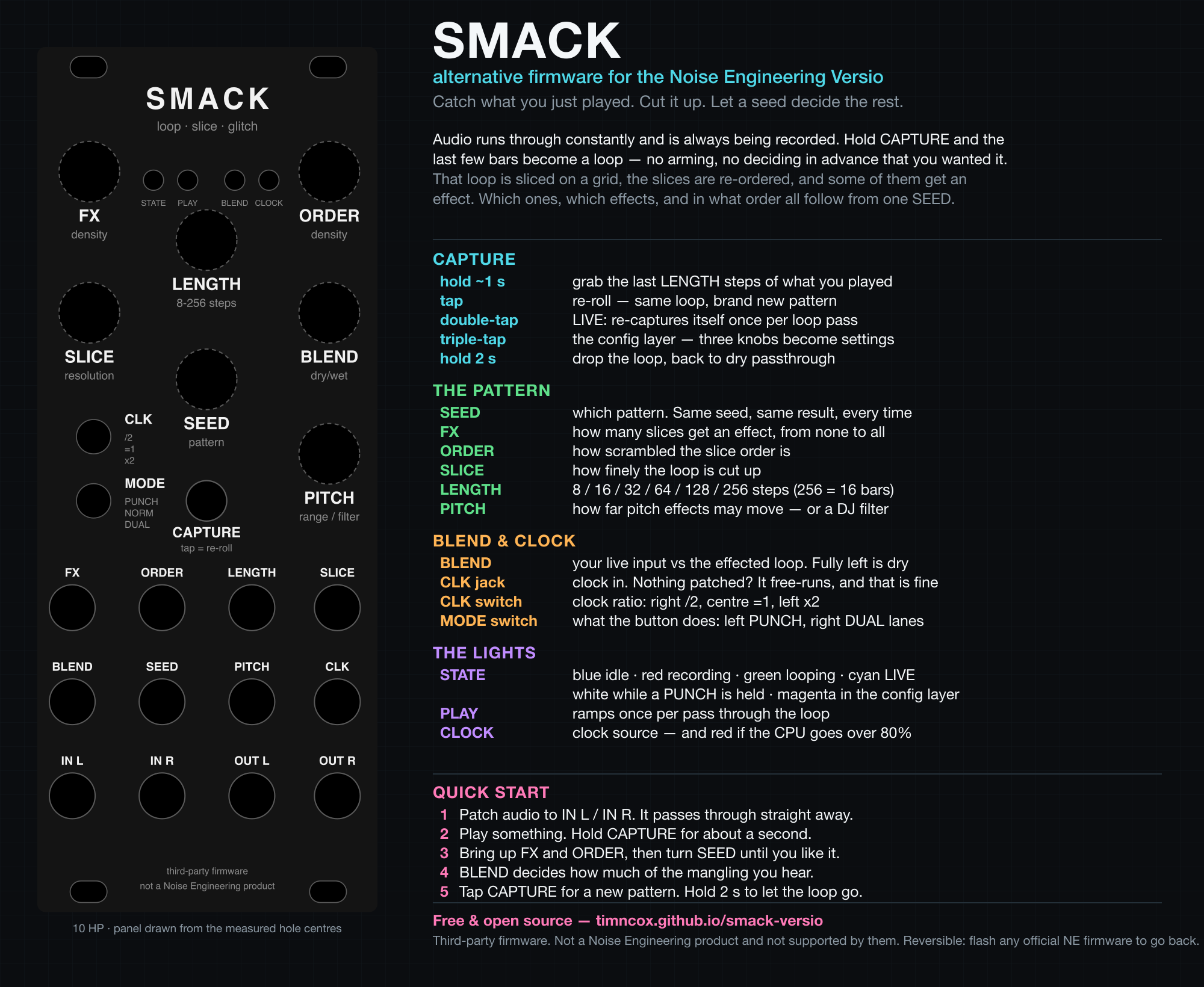
Everything the module does, on a single page: the panel on the left, what every control does on the right. Made for a forum post or a photo caption, where nobody is going to click through to a manual.

Smack Versio one-page control sheet: panel diagram
      on the left, colour-coded control descriptions on the right

The panel in it is not a drawing of the panel — it is the same SVG the faceplate template emits, from the same measured hole centres, so the sheet cannot drift away from the thing you would actually cut. Rebuild it with python3 faceplate/make_promo.py.

Drawing the panel at poster size is what caught two defects invisible at 50 mm wide: the lower switch legend printed over the CAPTURE button hole, and the button caption printed in the warning colour long after its position had been confirmed. Both are fixed. Scale is a debugging tool.

How it is built

10 — The parts worth knowing about

A 10 HP effect with seven knobs and 128 KB of internal flash does not leave much room to be careless in. These are the decisions that shaped it.

PieceWhat it is
Clock adapterGate edges become 24 ppqn MIDI clock, so the engine's timing model runs here untouched. It captures a bar from a synthetic pulse train to 0.02%
Ring recorder150 seconds, sized to hold two of the longest loop — the loop that is playing is protected from the recorder, so one would stall it
SDRAM allocatorThe engine runs on a bump pool in external RAM, 27.63 MB of 32 MB, which is what let it be ported with no surgery
Engine @ 48 kHzThe upstream Smack suite passes unmodified — the rate cost two constants and no engine logic. Three later fixes, all found on hardware, do diverge from upstream
DJ filterTwo cascaded TPT one-poles per channel: −56 dB at 1 kHz fully left, −72 dB at 100 Hz fully right, flat to 0.01 dB at centre
Persistent settingsThe config layer and the free-run tempo survive power cycles, behind a guard that refuses a struct written by any other build
Flash budgetThe shipping image is 117,132 of 131,072 bytes. It is built for size where the alternative build is built for speed, because only one of them is flash-bound
CPU headroomTwo hard runs read 50–75% and under 50%. The 80% alarm has never fired
Panel geometryDerived from a 1:1 print template and reproduces the Eurorack mounting standard to 0.01 mm. The button hole is the one placed by eye

Found something, or want it to do something it doesn't? Open an issue — a report from someone playing it is worth more than anything measurable on a laptop.

Specifications

Appendix
Platform

Daisy Seed

STM32H750, 480 MHz Cortex-M7, 64 MB SDRAM. Noise Engineering Versio, 10 HP.

Audio

48 kHz · 128

libDaisy offers no 44.1 kHz. The 128-frame block is required — the engine's clock regression was built against it.

Memory

150 s buffer

27.6 MB used of a 32 MB SDRAM pool, of 64 MB available.

Effects

26

One per lane at a time, not all at once — which is what makes the CPU question winnable.

The rest of them

Schwung modules for the Ableton Move

Smack Versio is the odd one out — everything below runs on the Move under Schwung rather than in a rack. Same hands, same habits, and Smack itself is where this engine comes from.